Managing appointments affects far more than a clinic calendar. Missed calls, scheduling delays, cancellations, and manual rescheduling can increase front-desk workload while making it harder for patients to access care.
AI appointment scheduling software can help clinics automate routine booking and appointment-management workflows. When implemented effectively, it can improve scheduling access, reduce repetitive administrative work, and help staff focus on patients and requests that require human attention.
Why Clinics Are Rethinking Appointment Scheduling
Traditional appointment scheduling often depends heavily on front-desk staff. Employees may need to answer calls, check provider availability, review appointment requirements, update calendars, and manage cancellations at the same time.
Research suggests that digital scheduling can improve appointment utilization in certain healthcare settings. A 2025 study published in Frontiers in Digital Health found that, in a private ophthalmology practice, online-booked appointments had a lower no-show rate than offline-booked appointments, at 1.8% compared with 5.9%. After online scheduling was introduced, unused appointments also decreased from 22.7% to 10.3%.
The same study produced different results in a university hospital setting, showing why clinics should evaluate scheduling technology based on their specialty, workflow, and patient population.
The goal is not simply to digitize the calendar. It is to create a scheduling process that improves patient access while reducing repetitive administrative work.
What Is AI Appointment Scheduling Software?
AI appointment scheduling software uses automation and artificial intelligence to support appointment-related tasks that would otherwise require manual staff involvement.
Depending on the platform, it may help patients:
- Book appointments
- Reschedule visits
- Cancel appointments
- Receive confirmations
- Receive reminders
- Access available appointment times
- Join a waitlist
More advanced systems can also apply scheduling rules based on provider availability, visit type, appointment duration, location, and other practice-specific requirements.
Unlike a basic online calendar, AI appointment scheduling software can support a larger portion of the patient scheduling journey. For example, appointment automation can connect booking, rescheduling, cancellations, reminders, and waitlist workflows within a more coordinated scheduling process.
Key Benefits of AI Appointment Scheduling Software
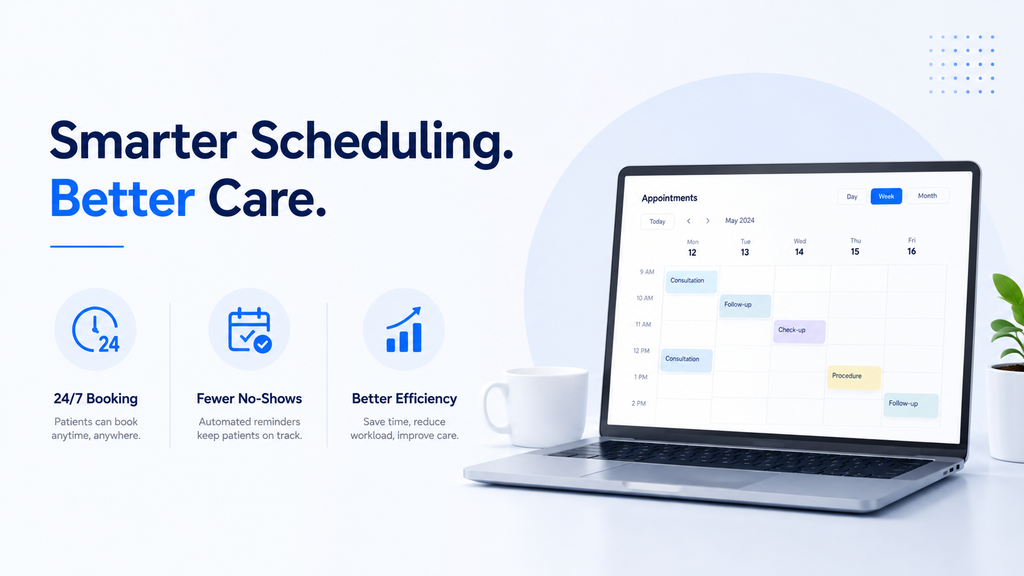
AI appointment scheduling software can simplify routine booking tasks while making it easier for patients to schedule, reschedule, or manage their appointments. By reducing manual workload and improving scheduling efficiency, it can help clinics create a smoother experience for both patients and staff.
1. Reduces Repetitive Front-Desk Work
One of the primary benefits of AI appointment scheduling software is reducing the volume of repetitive scheduling tasks handled manually by staff.
Front-desk employees often spend significant time answering questions about appointment availability, confirming bookings, processing cancellations, and helping patients reschedule.
Automating eligible requests can allow staff to focus more on responsibilities that require human involvement, including assisting patients in person, resolving unusual scheduling concerns, and handling complex administrative requests.
The purpose is not necessarily to replace staff. Instead, automation can help existing teams manage routine scheduling volume more efficiently.
2. Improves Patient Access
Patients may need to schedule or change an appointment outside regular office hours. For this, AI appointment scheduling software can provide additional scheduling access without requiring staff members to personally handle every request.
Depending on the workflow, patients may be able to schedule through online, phone, or messaging channels.
For clinics managing high volumes of patient calls, scheduling workflows can also work alongside healthcare call center automation to help manage routine appointment-related requests and route more complex conversations to staff.
Providing more than one access channel can help clinics accommodate different patient communication preferences while reducing unnecessary pressure on front-desk teams.
3. Makes Rescheduling and Cancellations Easier
A cancelled appointment does not always have to become an unused appointment slot. When patients can easily cancel or reschedule, clinics may have more time to respond to the opening.
The 2025 Frontiers in Digital Health study found that patients with online-booked appointments used cancellation and rescheduling functions more frequently. In the private-practice setting, online scheduling was also associated with improved appointment utilization after implementation.
Automated appointment workflows can also connect cancellations with waitlist management.
For example, when a patient cancels, an automated system may help identify other eligible patients waiting for an earlier appointment. This approach is explored further in AI waitlist management for medical clinics.
4. Helps Reduce Scheduling Errors
Manual scheduling becomes more complicated when clinics manage multiple providers, appointment types, locations, and visit requirements. AI appointment scheduling software can apply predefined scheduling rules consistently.
For example, clinics may create different workflows for:
- New patient appointments
- Follow-up visits
- Procedures
- Telehealth appointments
- Provider-specific services
This can help reduce scheduling conflicts and make it easier to manage different appointment requirements. However, the technology must be configured correctly. Automation can only perform as effectively as the rules and workflows established by the practice.
5. Supports Better Use of Appointment Capacity
Empty appointment slots can result from cancellations, no-shows, or appointments that never got booked.
Automated appointment scheduling for clinics can make available appointments easier for patients to access while helping practices respond more quickly to scheduling changes.
Further, in the private ophthalmology practice examined in the Frontiers in Digital Health study, unused appointments decreased from 22.7% to 10.3% after online scheduling was implemented. The rate of never-booked appointments also decreased from 8.6% to 1.6%.
These findings should not be interpreted as guaranteed outcomes for every clinic. However, they demonstrate how improved scheduling access can affect appointment utilization in an appropriate healthcare setting.
Clinics can also explore broader healthcare automation benefits when evaluating how scheduling technology can improve operational efficiency.
AI Scheduling Software for Medical Practices and Clinic Operations
AI scheduling software for medical practices can support more than appointment booking. When connected to existing systems and workflows, scheduling automation can also support:
- Appointment reminders
- Follow-up communication
- Call handling
- Waitlist workflows
- Appointment confirmations
Connecting these processes can reduce the number of separate tasks staff need to manage manually. For clinics exploring broader applications, AI use cases in healthcare demonstrate how appointment scheduling can connect with other administrative workflows.
The most effective approach is usually to identify high-volume, repetitive tasks that can follow structured workflows while ensuring staff remain available for situations requiring judgment or personal assistance.
AI Booking Software for Healthcare: Features to Look For
Not every AI booking software for healthcare platform offers the same capabilities. Clinics should evaluate whether a system matches their actual scheduling requirements.
Real-Time System Integration
The scheduling platform should work effectively with the technology already used by the clinic.
Depending on the practice, this may include:
- EHR systems
- Practice management software
- Provider calendars
- Phone systems
- Patient communication tools
A disconnected system can create more work if employees must manually update multiple platforms.
Before implementation, clinics should confirm what information is synchronized, how quickly updates occur, and how the system handles scheduling conflicts. A connected appointment automation workflow can help reduce the need for separate manual scheduling processes.
Rule-Based Scheduling
- Healthcare appointments are not always interchangeable.
- A new patient consultation may require more time than a follow-up appointment. A procedure may require a particular provider, room, location, or preparation process.
- AI scheduling software for medical practices should allow clinics to create rules that reflect their actual operational requirements.
- Before selecting a platform, practices should confirm whether appointment rules can be configured for their specialty and provider schedules.
Multi-Channel Patient Access
- Patients may prefer different communication channels.
- Some may want to schedule online, while others may prefer calling the practice or responding to a message.
- A flexible scheduling workflow can support the channels most relevant to the clinic’s patient population.
- For practices exploring voice-based appointment communication, Voice AI for healthcare can support patient conversations and appointment-related workflows across the phone channel.
Automated Reminders
- Scheduling should not end once an appointment is booked.
- Patients may need reminders and a convenient way to confirm, cancel, or reschedule.
- The 2025 Frontiers in Digital Health study found an association between increased use of SMS reminders and lower no-show rates in the university hospital setting studied.
- Reminder strategies should be designed according to the clinic’s patient population and appointment workflow. For a deeper look at this area, clinics can explore automated appointment reminder systems.
Waitlist and Cancellation Management
- When an appointment becomes available, timing matters.
- A platform that supports waitlist workflows can help practices respond more efficiently to cancellations.
- Instead of requiring staff to manually search for eligible patients and make repeated calls, an automated workflow may support faster outreach and appointment confirmation.
- For a more detailed explanation, see AI waitlist management for medical clinics.
Choosing a Medical Appointment Scheduling System
Selecting a medical appointment scheduling system should begin with the clinic’s existing challenges rather than a list of software features.
Identify Current Scheduling Problems
Start by identifying where the greatest scheduling pressure occurs.
Common challenges include:
- High call volume
- Missed calls
- Frequent no-shows
- Double-bookings
- Scheduling delays
- Unfilled cancellations
- High front-desk workload
Understanding these problems makes it easier to evaluate whether a platform addresses an actual operational need.
Evaluate Specialty Requirements
Different specialties require different scheduling workflows.
A dermatology practice, orthopedic clinic, and primary care office may all have different appointment durations, provider requirements, preparation instructions, and follow-up processes.
Before choosing a medical appointment scheduling system, practices should confirm whether the technology can support their specific appointment types and scheduling rules.
A generic scheduling workflow may not be appropriate for every specialty.
Confirm Integration Requirements
A scheduling platform should simplify operations rather than create another disconnected system. Practices should understand how the technology integrates with their:
- EHR
- Practice management platform
- Provider calendars
- Patient communication systems
- Phone infrastructure
It is also important to understand what happens when information cannot be synchronized, or an integration experiences an issue.
Clinics considering a broader connected approach can explore healthcare automation solutions.
Review Implementation and Support
Even the best AI appointment scheduling software can create operational problems if implementation is poorly managed. Before choosing a solution, ask how scheduling rules will be configured, how staff will be trained, how exceptions will be handled, and what support will be available after launch. Successful implementation depends on how well the technology fits into daily clinic operations.
What Makes the Best AI Appointment Scheduling Software?
The best AI appointment scheduling software should support the entire appointment journey, not just allow patients to choose an available time. Important capabilities include appointment booking, confirmations, reminders, cancellations, rescheduling, and waitlist management. Bringing these activities into a connected workflow can help reduce repetitive administrative work and make appointment management more convenient for patients.
It should also integrate effectively with existing clinic systems, such as EHRs, practice management platforms, provider calendars, and communication tools. The software should be flexible enough to apply scheduling rules based on provider availability, appointment type, visit duration, location, and other practice-specific requirements. This can help clinics maintain more accurate schedules while reducing manual updates and potential scheduling conflicts.
Finally, the right solution should balance automation with human support. While AI can efficiently manage routine and structured scheduling requests, patients may occasionally have complex questions or unusual requirements. A strong system should therefore provide clear options for escalating these situations to staff, helping clinics improve efficiency without compromising the patient experience.
Automated Appointment Scheduling for Clinics and Patient Experience
Automated appointment scheduling for clinics can make it easier for patients to book and manage appointments without relying entirely on phone calls or manual staff assistance. Patients may be able to check availability, schedule a visit, receive confirmations, and make changes to their appointments through convenient communication channels. For a broader understanding of connected scheduling workflows, readers can explore Appointment Automation.
A smoother scheduling process can also improve the overall patient experience. Easy access to appointment information, reminders, cancellation, and rescheduling options can reduce unnecessary friction and help patients manage their healthcare visits more conveniently.
However, automation should work alongside human support rather than completely replace it. While automated systems can efficiently handle routine scheduling requests, complex questions or unusual patient requirements should have a clear path to staff. Clinics can explore Healthcare Call Center Automation to understand how automated communication and human support can work together.
Data Security and Compliance Considerations
AI booking software for healthcare may handle protected health information depending on how the technology is used and what information is involved.
For this reason, security and compliance should be considered before implementation.
Healthcare organizations should understand:
- What information the platform collects
- Where patient information is stored
- Who can access the data
- How access is controlled
- How information is transmitted
- Whether the vendor has responsibilities as a business associate
Clinics should evaluate compliance requirements based on their specific workflow rather than relying only on general vendor claims.
Conclusion
AI appointment scheduling software can help clinics reduce repetitive scheduling work, improve patient access, and manage appointment changes more efficiently.
Research on online scheduling suggests that the impact can include improved appointment utilization and lower no-show rates in certain practice settings. However, results can vary between healthcare organizations, making workflow design and implementation essential.
The right solution should integrate with existing systems, support clinic-specific scheduling rules, provide convenient patient access, and include clear processes for human escalation.
For clinics exploring scheduling as part of a broader automation strategy, MantraAssist’s appointment automation and healthcare automation solutions can help connect scheduling with patient communication and other administrative workflows.
Sources
- Frontiers in Digital Health — Efficient Patient Care in the Digital Age – Read the Frontiers in Digital Health study
- U.S. Department of Health and Human Services — HIPAA and Cloud Computing – Read HHS guidance on HIPAA and cloud computing
- U.S. Department of Health and Human Services — Business Associates – Read HHS guidance on business associates
- MantraAssist — AI Appointment Scheduling Software – Explore MantraAssist Appointment Automation
- MantraAssist — Healthcare Call Center Automation – Explore MantraAssist Call Center Automation
Frequently Asked Questions
AI appointment scheduling software can make booking, reminders, cancellations, and rescheduling more convenient for patients. Research has found lower no-show rates for online-booked appointments in certain practice settings, although results may vary based on the healthcare organization and patient population.
Yes, provided the system matches the clinic’s workflow and patient volume. Small practices should prioritize integration, ease of implementation, scheduling flexibility, and support for their specific appointment types.
Many systems can apply rules based on appointment duration, provider availability, visit type, location, and other requirements. Clinics should confirm that the platform supports their specialty-specific workflows.
Look for system integration, configurable scheduling rules, patient communication options, reminders, cancellation and waitlist workflows, security safeguards, implementation support, and clear human escalation.
Requirements depend on the specific information involved, the workflow, and the vendor’s role. Healthcare organizations should evaluate how patient information is handled and determine what privacy and security obligations apply.