Missed appointments create a problem that affects both sides of healthcare. Patients can miss needed care, while clinics lose valuable appointment capacity and spend additional staff time trying to manage the empty slot.
The good news is that reminders can make a measurable difference. A systematic review and meta-analysis of healthcare studies found that patients receiving electronic notifications were more likely to attend appointments and were less likely to no-show than patients who received no reminders. The review also found that multiple notifications could be more effective than a single reminder.
That makes automated reminder systems for patients more than a convenient messaging tool. When properly configured, they can become part of a broader patient-access workflow that helps patients confirm, cancel, or reschedule appointments while reducing repetitive administrative work for staff.
But not every reminder platform offers the same capabilities. Some systems send a basic text message before an appointment. More advanced platforms can combine SMS, voice, email, scheduling, rescheduling, patient responses, and EHR synchronization into one workflow.
This guide explains the features clinics should prioritize, how different communication channels fit together, what multi-location practices should consider, and how to evaluate an appointment reminder platform before implementation.
The Real Cost of Missed Appointments
A missed appointment does not simply leave a space on the schedule. It can interrupt continuity of care, reduce provider utilization, and create additional work for scheduling teams.
Patients miss appointments for many ordinary reasons: they forget, their plans change, they cannot arrange transportation, or they no longer need the appointment but do not contact the clinic.
A well-timed reminder allows patients to act before the appointment is lost.
Research supports this basic approach. One systematic review covering 26 studies found that electronic notifications were associated with a 25% reduction in no-shows compared with no notification, while patients receiving notifications were 23% more likely to attend.
Another systematic review of telephone, SMS, and automated phone reminders found that almost all included studies reported a benefit from reminders, although effectiveness varied by approach.
The evidence does not mean that every reminder system will produce the same result. Patient population, specialty, message design, timing, communication channel, and existing scheduling processes all influence outcomes.
That is why the right question is not simply, “Does the software send reminders?”
It is:
Does the system make it easier for patients to keep, change, or cancel appointments—and easier for staff to act on those responses?
What Automated Reminder Systems for Patients Actually Do
At the most basic level, an automated reminder tells a patient when an appointment is scheduled.
A stronger system can do considerably more.
Instead of sending a one-way message, it can give patients a way to confirm the appointment, request a different time, or cancel when they know they cannot attend. That creates an opportunity for the clinic to reuse the appointment rather than discovering the cancellation too late.
Modern platforms may also combine reminders with scheduling and waitlist workflows. For example, MantraAssist currently describes appointment automation across voice, SMS, and online portals, including scheduling, rescheduling, cancellations, reminders, and waitlist management.
The difference is important. A reminder that simply says “You have an appointment tomorrow” informs the patient. A reminder that also lets the patient take action can help the clinic manage the appointment itself.
Core Features Every Clinic Needs
Not every appointment reminder platform is designed for the same level of automation. Clinics should evaluate the following capabilities before choosing a system.
| Feature | Why It Matters |
|---|---|
| Multi-channel reminders | Reaches patients through the communication method they are most likely to use |
| Confirmation and rescheduling | Lets patients take action without calling the front desk |
| Automated voice calls | Provides an alternative for patients who prefer or require voice communication |
| EHR integration | Keeps appointment information synchronized and reduces duplicate data entry |
| Configurable reminder timing | Allows different workflows for different appointment types |
| Patient response handling | Turns replies into actionable scheduling information |
| Waitlist support | Creates an opportunity to backfill cancelled appointments |
| Staff escalation | Routes complex or sensitive situations to a human |
| Reporting and analytics | Helps clinics measure response, attendance, cancellation, and operational trends |
| Multi-location management | Gives larger groups centralized control while supporting local workflows |
A platform does not necessarily need every advanced feature on day one. However, clinics should understand which capabilities they may need as appointment volume, provider count, or location count grows.
1. Multi-Channel Patient Communication
Patients do not all communicate in the same way.
SMS can be useful for short, time-sensitive reminders. Email may be better for longer instructions or preparation information. Voice calls remain useful when a patient is more comfortable speaking with someone or when a text message is unlikely to receive a response.
Research has consistently examined SMS as an effective appointment-reminder channel, with systematic reviews finding improved attendance compared with no reminders.
However, evidence also suggests that voice reminders can perform well in some settings. One systematic review found automated reminders were beneficial overall and reported differences between manual and automated phone approaches.
For that reason, clinics should avoid choosing a system based on one communication channel alone.
The better approach is to create a communication strategy that reflects patient preferences and appointment risk.
2. Confirmation, Cancellation, and Rescheduling
A reminder becomes much more useful when the patient can act on it.
Instead of requiring patients to call the clinic, a message can provide a simple way to confirm or request a change.
This creates two benefits.
First, it reduces unnecessary calls to the front desk. Second, when a patient cannot attend, the practice learns about the opening earlier and has more time to offer it to someone else.
Reminder systems can therefore support more than attendance. A systematic review found that reminder systems may also increase advance cancellations and rescheduling, creating opportunities for healthcare organizations to reallocate appointments.
For clinics evaluating automated reminder systems for patients, this is one of the most important distinctions to make: does the platform simply notify patients, or does it help manage what happens next?
3. Automated Voice Call Reminders
Text messaging should not automatically replace voice communication.
Some patients respond better to a phone call, while certain populations may need a more accessible communication option. Automated voice technology can provide a scalable alternative to manual calling without requiring front-desk staff to spend hours dialing patients individually.
Current healthcare AI platforms can use voice agents for appointment scheduling, reminders, and follow-ups. MantraAssist, for example, describes voice AI that can handle routine patient calls and appointment workflows, including booking, cancellation, rescheduling, and reminders.
The important feature is not simply “AI voice.” Clinics should ask whether the system can recognize patient responses, handle common scheduling requests, and transfer conversations to staff when a situation falls outside its rules.
4. EHR and Practice Management Integration
Integration is one of the most important technical considerations.
If staff have to manually copy appointment information from the EHR into a separate reminder platform, the clinic has not eliminated much of the administrative burden.
A useful system should synchronize relevant appointment information with the clinic’s scheduling environment and minimize duplicate data entry.
Current scheduling automation platforms emphasize real-time synchronization between calendars and EHRs so that bookings, cancellations, and changes remain consistent across connected systems.
Before choosing a vendor, ask:
- Which EHRs and practice management systems are supported?
- Is the integration real-time or batch-based?
- Does a patient reschedule automatically update the appointment?
- How are cancellations handled?
- What happens if the EHR and reminder platform contain conflicting information?
- Can staff see the communication history?
These questions can reveal limitations that are not obvious from a feature list.
5. Configurable Reminder Timing
There is no universal reminder schedule that works for every clinic.
A routine follow-up appointment may need a different communication sequence from a procedure requiring preparation. A patient who schedules six months ahead may need more than one reminder, while a same-week appointment requires a different workflow.
Research has found that multiple notifications can improve attendance compared with a single notification, although the optimal timing and frequency can vary.
Clinics should therefore look for configurable timing rather than a fixed reminder schedule.
For example, a practice could use:
- An initial reminder several days before the appointment
- A confirmation request closer to the visit
- A final reminder shortly before the appointment
- An additional outreach step when a patient has not responded
The exact sequence should be tested using the clinic’s own attendance and response data.
6. Patient Response Handling
Sending a reminder is only half of the process.
What happens when the patient replies?
A sophisticated system should distinguish between common responses such as:
- Confirming the appointment
- Requesting a different time
- Cancelling
- Asking a basic scheduling question
- Requesting human assistance
This reduces the number of messages that simply land in a shared inbox waiting for someone to interpret them.
It also creates a cleaner workflow for front-desk teams. Staff can focus on exceptions rather than manually processing every confirmation.
7. Waitlist and Cancellation Backfill
A cancellation creates an opportunity if the practice can fill the opening quickly.
That is why waitlist functionality can be a valuable companion to reminders.
If a patient cancels through an automated reminder, the system can potentially identify another patient who has requested an earlier appointment and initiate outreach according to the clinic’s rules.
This connects two workflows that are often treated separately:
Reminder → Cancellation → Available slot → Waitlist outreach → New appointment
A platform that supports both reminders and waitlist management can therefore help practices move from simply reducing no-shows to actively improving appointment utilization.
MantraAssist currently lists waitlist filling alongside its appointment automation capabilities.
8. Human Escalation
Automation should not attempt to handle every patient interaction independently.
Patients may have questions that require staff judgment. A scheduling request may involve clinical preparation, insurance requirements, provider restrictions, or another issue that the automated workflow cannot safely resolve.
The system should therefore have clear escalation rules.
A good workflow might automatically handle a straightforward confirmation but transfer a complex request to staff.
This human-in-the-loop approach is especially important for healthcare because efficiency should not come at the expense of patient experience or appropriate oversight.
9. Reporting and Analytics
A clinic cannot determine whether its reminder strategy is working without measuring results.
At minimum, reporting should help practices track:
- Appointment attendance
- No-show rates
- Cancellation rates
- Rescheduling activity
- Patient response rates
- Reminder delivery
- Communication-channel performance
- Appointments recovered after cancellation
These metrics can reveal where a workflow needs adjustment.
For example, a clinic may discover that SMS messages receive fast responses for routine appointments while voice outreach performs better for a particular patient group. Instead of applying one workflow to everyone, administrators can use those insights to refine their approach.
10. Multi-Location Management
A single-location clinic can often manage reminders with a relatively simple workflow.
A multi-location group has a different challenge.
It may have separate providers, calendars, appointment types, staff teams, and patient populations across several sites. A centralized reminder platform can help administrators establish consistent policies while allowing individual locations to maintain appropriate scheduling rules.
The best automated appointment reminder software for multi-location medical practices should therefore provide both centralized oversight and local flexibility.
Administrators should be able to monitor performance across locations while individual clinics can manage their own appointment types, reminder timing, and escalation requirements where necessary.
Without centralized reporting, leadership may know that the system is running but not whether it is actually performing consistently across the organization.
Where MantraAssist Fits In
MantraAssist is positioned as a healthcare AI platform covering patient communication and scheduling workflows.
Its current appointment automation offering includes scheduling, rescheduling, cancellations, reminders, and waitlist management across voice, SMS, and online portals. It also describes real-time synchronization of confirmed bookings with calendars and EHRs.
Its voice AI offering focuses on routine patient calls, including appointment scheduling, reminders, follow-ups, and call routing. The platform also describes multilingual voice support and escalation to human staff when needed.
For clinics evaluating automated reminder systems for patients, that broader workflow is worth considering. The reminder itself is only one component. Scheduling, rescheduling, cancellation handling, waitlist management, and human escalation can all affect the final operational outcome.
Practices should still evaluate any platform against their own EHR, workflows, patient population, compliance requirements, and reporting needs before making a purchasing decision.
Choosing the Right System for Your Clinic
Selecting an appointment reminder platform should begin with the clinic’s workflow rather than the vendor’s feature list.
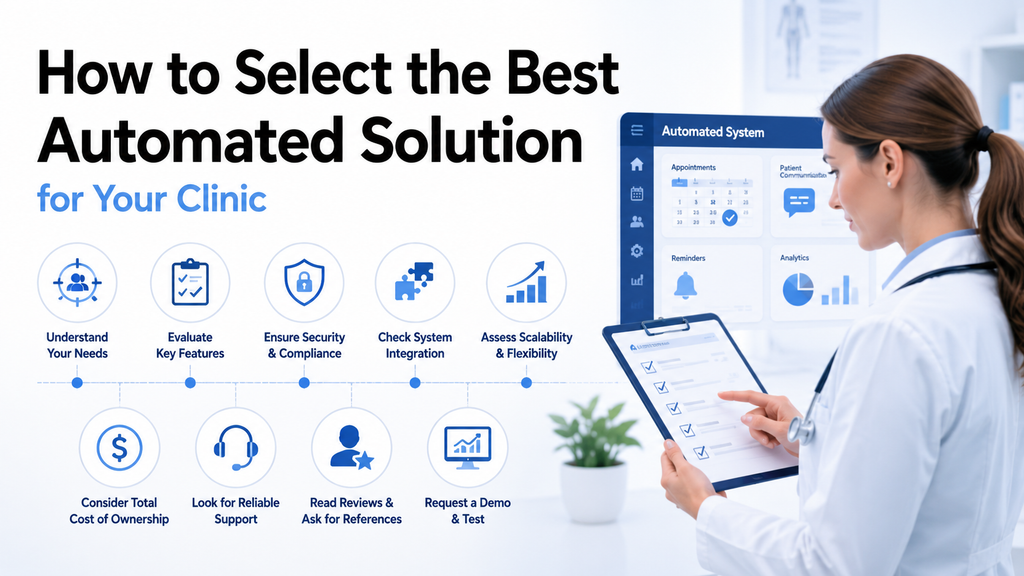
Ask these questions:
Does it support multiple communication channels?
Look for the channels your patients actually use, including SMS, voice, and email where appropriate.
Can it integrate with your EHR?
Confirm exactly how appointments, cancellations, confirmations, and rescheduling changes move between systems.
Can patients take action directly?
A reminder should ideally make it easy to confirm, cancel, or request a new appointment without unnecessary calls.
Can staff intervene?
Ask how the system identifies conversations that require human assistance and how those interactions are transferred.
Can reminder timing be customized?
Different appointment types may require different schedules. Avoid systems that force every patient into one rigid reminder sequence.
Does it support multiple locations?
If your organization operates several sites, check whether administrators can manage them centrally without eliminating local flexibility.
What reporting is available?
Make sure the platform can show whether reminders are actually improving attendance and reducing administrative workload.
Can the system scale?
Consider future providers, locations, appointment volume, and communication requirements before selecting a platform.
Getting the Rollout Right
Buying the software is only the beginning.
Start with one location, provider group, or appointment type if possible. This allows staff to test reminder timing, patient messaging, escalation rules, and scheduling integrations before expanding.
Define the workflow before switching it on.
Decide:
- When should the first reminder be sent?
- When should patients receive a follow-up?
- What happens when someone cancels?
- How are unresponsive patients handled?
- Which cases require staff intervention?
- How quickly should cancelled appointments be offered to waitlisted patients?
Then establish baseline metrics.
Record current no-show rates, cancellation rates, staff time spent on reminder calls, and the number of appointments that are rescheduled or recovered.
After launch, compare those metrics regularly.
Do not assume that the first configuration will be the best one. Research shows that reminder effectiveness can depend on how the system is designed and implemented, and evidence supports testing different approaches rather than assuming one message or timing works for everyone.
What Patients Actually Need From Reminder Systems
The best reminder is not necessarily the one with the most technology behind it.
Patients generally need three things:
Clarity: What appointment is this?
Convenience: How do I confirm, cancel, or reschedule?
Control: What can I do if my plans change?
Messages should be concise, easy to understand, and appropriate for the communication channel.
Clinics should also consider accessibility and patient preferences. A text-only strategy may not work equally well for every population, while a voice-only strategy can create unnecessary staff workload.
A multi-channel approach gives practices more flexibility while keeping the patient experience at the center.
Conclusion
Missed appointments create avoidable pressure on both patients and healthcare organizations. Reminder systems cannot eliminate every no-show, but research consistently shows that well-designed reminders can improve attendance.
The strongest automated reminder systems for patients go beyond sending a message the day before a visit. They help patients confirm or change appointments, support multiple communication channels, connect with existing scheduling systems, identify cancellations, and give staff visibility into situations that require human attention.
For smaller clinics, that can mean less time spent making repetitive calls. For multi-location organizations, it can also mean greater consistency and centralized visibility across sites.
The best way to evaluate a platform is to start with your own numbers. Measure current no-shows, cancellations, staff workload, response rates, and unused appointment capacity. Then choose a system that can address the specific gaps you find.
The goal is not simply to automate reminders.
It is to build a smoother appointment workflow in which patients receive timely information, staff spend less time on repetitive tasks, and available clinical capacity is used as effectively as possible.
Frequently Asked Questions
Evidence generally supports the use of appointment reminders to improve attendance. A systematic review and meta-analysis found that electronic notifications increased attendance and reduced no-shows across healthcare settings. However, the size of the effect varies between studies and patient populations.
Neither channel is universally best. SMS reminders have strong evidence supporting improved attendance, while voice reminders can also be effective. The right choice depends on the patient population, appointment type, and communication preferences.
Yes, depending on the platform. More advanced systems can allow patients to confirm, cancel, or reschedule rather than simply receiving a one-way notification.
Many modern scheduling platforms are designed to integrate with EHRs and practice management systems. However, integration capabilities differ by vendor, so clinics should verify compatibility and exactly what information is synchronized before implementation.
There is no single feature for every practice. In most cases, the strongest foundation is reliable EHR integration combined with configurable reminders, patient self-service, multiple communication channels, and clear staff escalation.