
How many appointment slots does your practice lose to cancellations every week? Most clinics track cancellations and no-shows, but far fewer track what happens after an appointment disappears from the schedule.
A cancellation does not have to mean lost revenue. If a practice can identify the opening quickly, find a suitable patient who is already waiting, and confirm that patient before the appointment time arrives, an empty slot can become a completed visit.
That is the core idea behind AI Waitlist Management for Medical Clinics: using automation to turn cancelled appointments into opportunities to improve patient access, recover revenue, and reduce repetitive administrative work.
The challenge becomes greater for practices managing multiple providers, specialties, or locations. Staff cannot constantly monitor every schedule while also handling calls, check-ins, insurance verification, patient questions, and other front-desk responsibilities.
This guide explains how AI-powered waitlist management works, where it can make the biggest difference, what practices should consider before implementation, and how to determine whether automation is worth the investment.
Why Empty Appointment Slots Cost More Than They Look
An empty appointment slot represents more than unused time on a calendar. It is provider capacity that cannot be stored and used later.
A primary care appointment can generate somewhere between $180 and $250 in revenue, while a specialist appointment may generate $350 to $800 depending on the complexity of the visit. When a patient cancels shortly before an appointment, and the practice cannot fill the opening, that potential revenue disappears.
No-show rates can also create significant unused capacity. The source material places average no-show rates at approximately 18% to 23% across specialties. Manual waitlist outreach, however, often captures only a small percentage of the openings created by cancellations and no-shows.
The operational problem is straightforward. A staff member has to notice the opening, identify an appropriate patient, contact that patient, wait for a response, confirm the appointment, and update the schedule. Every step introduces another opportunity for the appointment to remain unfilled.
Front-desk teams already manage dozens of inbound calls and administrative responsibilities each day. Waitlist management frequently becomes a task staff complete only when they have spare time. Unfortunately, cancellations do not wait for a convenient moment.
The problem becomes even more complicated in multi-provider and multi-location practices. A cancellation in one department may not be visible to a scheduler in another, even when an appropriate waitlisted patient is willing to take the appointment.
Without a shared, real-time view of available capacity, the practice can lose both sides of the opportunity: the appointment remains empty while a patient continues waiting for care.
What Manual Waitlist Management Actually Looks Like
Many clinics still manage waitlists using spreadsheets, paper lists, notes in the EHR, or scheduling comments. When a cancellation occurs, a staff member has to notice the opening and search for patients who might be able to take it.
The scheduler may then call patients one by one, leave voicemails, and wait for callbacks. If the first patient does not respond quickly, the scheduler moves to the next person. If nobody answers, the process continues until the appointment is either filled or the available window disappears.
This approach can work when cancellation volume is low and staff have enough time to manage outreach. It becomes much harder to sustain when a practice has hundreds or thousands of patients on its waitlist.
The central weakness is timing. A patient who would gladly accept an earlier appointment may never hear about it because the staff member does not reach them quickly enough.
This is the gap that smart waitlist automation is designed to address. Instead of waiting for a scheduler to discover the opening and begin making calls, an automated system can respond to the cancellation almost immediately.
How AI Waitlist Management for Medical Clinics Works
The workflow is relatively simple, but each step plays an important role in recovering cancelled appointment capacity.
First, the system detects an opening when a cancellation or no-show creates an available slot. Depending on the technology and integration, this can happen through real-time monitoring of the EHR or practice management system.
Next, the system identifies patients who may be suitable for the appointment. Matching can consider appointment type, provider preference, clinical urgency, and availability preferences provided by the patient.
Once suitable patients are identified, the system can automatically contact them through their preferred communication channel. Text messaging is commonly used because patients can respond quickly, while phone and email can provide additional options.
The system can then confirm the appointment based on predefined rules. For example, a first-response workflow can allow the first eligible patient to accept the appointment while notifying other patients that the slot has been taken.
Finally, the scheduling system is updated after confirmation. This reduces manual data entry and helps keep the patient’s appointment information synchronized.
Speed is one of the biggest advantages. The source material reports that some clinics using this type of automation have rebooked as many as 95% of cancelled slots, sometimes within five minutes of an opening appearing, compared with approximately 15% through manual outreach. These are reported outcomes, not guaranteed results, and actual performance varies by vendor, patient population, cancellation patterns, and integration.
The broader value of AI Waitlist Management for Medical Clinics is its ability to reduce the time between a cancellation and a confirmed replacement appointment.
Manual vs. AI Waitlist Scheduling for Medical Practices
Managing cancellations effectively is important for both patient access and provider utilization. Manual waitlist management depends heavily on staff availability, while automated systems can handle much of the repetitive matching and outreach process.
| Factor | Manual Waitlist Management | AI Waitlist Management |
|---|---|---|
| Cancellation detection | Staff notices the opening | Automated detection through system integration |
| Typical reported fill rate | Around 15% of openings | Up to 95% in reported cases |
| Time to fill | Can take hours | Some reported systems fill within five minutes |
| Staff involvement | Calls, callbacks, matching, updates | Oversight and exception handling |
| Patient outreach | Phone calls and voicemails | Text-first with phone/email fallback |
| Scheduling updates | Often manual | Can be automated after confirmation |
Fill rates are only one part of the comparison. Manual outreach can consume substantial staff time because each opening requires individual attention. Automated workflows can reduce that workload by handling routine matching, messaging, and confirmation.
Practices should not assume that every vendor will deliver identical results. Actual fill rates, response times, integration capabilities, and implementation requirements vary. Ask vendors for current performance data relevant to your specialty and patient population.
The Financial Case for Automated Waitlist Filling
The financial argument for AI Waitlist Management for Medical Clinics is relatively straightforward because the value is closely connected to recovered appointment capacity.
A simple calculation is:
Recovered appointments × average revenue per appointment = potential recovered revenue
The source material includes a reported case in which an AI agent produced a 35-times return on investment from backfilling last-minute cancellations. It also cites a large health system that estimated an $8 million increase in value from higher throughput after implementing AI-driven scheduling. Another example involved a clinic reducing time spent on waitlist management from approximately 40 hours per month to fewer than five.
These are individual examples, not universal benchmarks. Results depend on cancellation volume, average reimbursement, appointment types, patient responsiveness, and how many openings can realistically be offered to waitlisted patients.
Consider a specialty practice with five providers that loses three appointments each day to unfilled cancellations. If the average value of each appointment is $300, that represents approximately $900 in potentially recoverable revenue each day.
Over five working days, that is $4,500. Across roughly 52 weeks, the annual opportunity could approach $234,000 before accounting for holidays, schedule variations, or different cancellation volumes.
A practice does not need to recover every cancelled appointment for automation to have financial value. Recovering a meaningful portion of otherwise unused appointments can create a measurable return, particularly for practices with consistent short-notice cancellations.
Where Human Oversight Still Matters
Automation is useful for repetitive scheduling tasks, but it should not replace human judgment.
Some appointments have additional operational or clinical requirements. A surgical appointment, for example, may depend on specific equipment, anesthesia availability, staffing, or other resources. A cancellation in that type of schedule may require staff to verify that the opening can actually be offered.
Sensitive or urgent cases may also require human involvement. Behavioral health, oncology, and other settings can involve circumstances where automated outreach should be limited or carefully controlled.
A well-designed system should allow practices to create escalation rules. Routine appointments can move through an automated workflow, while more complex cases are flagged for staff review.
The best AI Waitlist Management for Medical Clinics workflow is therefore not necessarily the one that automates every decision. It is the one that handles predictable administrative work while giving staff control over situations requiring judgment.
How Waitlist Automation Works Across Specialties
The value of automated waitlist management varies by specialty and appointment structure.
Dermatology
Dermatology practices may manage significant demand for routine, follow-up, and cosmetic appointments. Patients who have already requested an earlier appointment can be valuable when a short-notice opening becomes available.
Automation can identify eligible patients and offer the appointment quickly, potentially filling a slot that might otherwise remain empty.
Dental and Orthodontic Practices
Dental and orthodontic practices often experience cancellations related to work schedules, school commitments, transportation, and other conflicts. A standing waitlist gives practices a pool of patients already interested in earlier appointments.
Automating matching and outreach allows staff to respond to openings without repeatedly calling patients.
Physical Therapy and Rehabilitation
Physical therapy practices often manage recurring appointments and multi-week plans of care. This can make waitlist coordination more complicated because an opening may need to match specific timing or provider requirements.
Automation can help identify patients whose availability fits the appointment while reducing manual coordination.
Behavioral Health
Behavioral health practices may benefit from automation for routine follow-ups, but sensitive or acute situations can require a different approach.
For these practices, escalation rules are particularly important. Automated systems should allow staff to intervene when a patient or appointment requires personal communication.
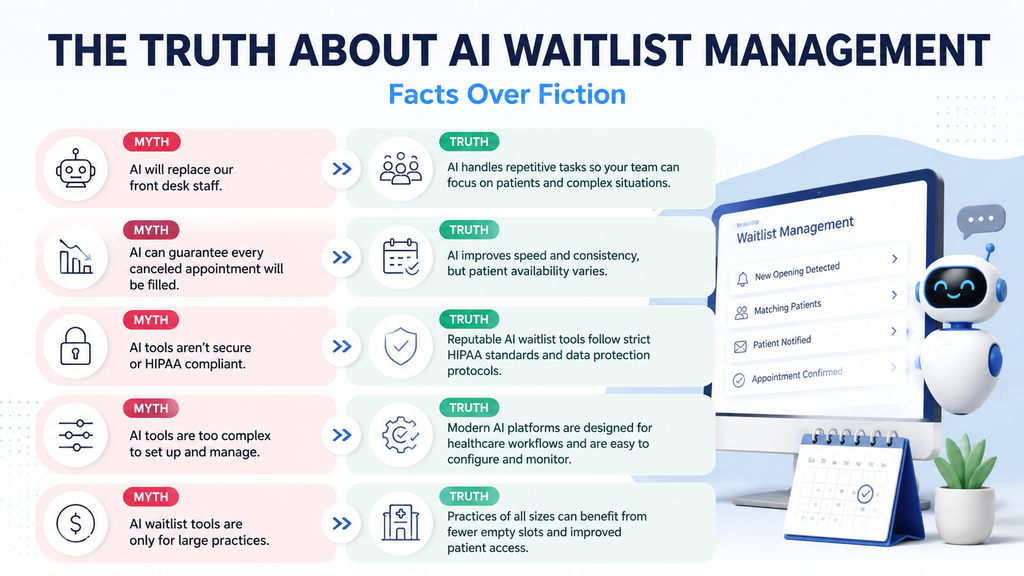
Common Myths About AI Waitlist Tools
Several misconceptions can make practices hesitant to automate their waitlist.
Choosing a Waitlist Management Solution
Choosing AI Waitlist Management for Medical Clinics should begin with operational requirements rather than a vendor’s feature list.
Start with integration. Can the system connect with your EHR or practice management platform so cancellations and appointment changes are reflected quickly? Delayed synchronization can undermine automated waitlist management.
Next, examine patient prioritization. The system should be able to account for more than who has waited the longest. Appointment type, provider preference, availability, and clinical considerations may all influence which patient should receive an opening.
Communication options matter as well. Text messaging can support rapid outreach, while phone and email alternatives may be important for patients who do not reliably use text messages.
Ask whether staff can review certain offers before they are sent. This is especially important for sensitive appointment types or situations requiring clinical or operational judgment.
Security and compliance should also be evaluated. Any platform handling protected health information should be assessed for appropriate HIPAA compliance, contractual requirements, and the availability of a Business Associate Agreement where applicable.
Finally, understand implementation requirements. Ask what needs to be configured, how long integration typically takes, what staff training involves, and what ongoing support is included.
Implementation: What a Realistic Rollout Looks Like
A successful implementation of AI Waitlist Management for Medical Clinics does not need to happen across the entire practice at once.
The source material suggests planning for approximately six to ten weeks for full deployment. The first two to three weeks can focus on integration and mapping appointment types to matching rules.
The next stage can focus on staff training. Front-desk teams should understand which appointments the system can handle automatically, which cases require review, and how they can intervene when necessary.
A soft launch is particularly useful. Rather than enabling automation for every appointment type immediately, a practice can start with one or two straightforward categories. Running the system for two to three weeks provides an opportunity to identify configuration issues, review patient responses, and build staff confidence.
Once the workflow is stable, the practice can expand it to additional appointment types and providers.
Practices should also track performance after launch. Useful metrics include cancellation volume, percentage of cancelled appointments recovered, average time to fill, patient response rates, and staff hours spent managing the waitlist.
Final Thoughts
An empty appointment slot is one of the more preventable sources of lost capacity in a medical practice. The problem is not always a lack of patient demand. Often, the practice simply does not have enough time to connect the right patient with the opening before it disappears.
AI Waitlist Management for Medical Clinics addresses that timing problem by detecting available appointments, identifying suitable waitlisted patients, communicating with them quickly, and supporting confirmation without requiring staff to manage every step manually.
The technology does not eliminate the need for front-desk teams. Instead, it can shift their time away from repetitive calls and callbacks toward work that requires human attention.
Practices considering this technology should start with their own data. Pull 90 days of cancellation and no-show records, calculate how many appointment slots remain unfilled, and estimate the value of that lost capacity.
That baseline provides a more useful way to evaluate whether waitlist automation can deliver a meaningful operational and financial return.
Frequently Asked Questions
Some systems can begin outreach within seconds of detecting a cancellation, and the source material reports examples of openings being filled within approximately five minutes. Actual speed depends on system integration, patient response time, appointment rules, and the technology being used.
Patients actively waiting for an earlier appointment may respond positively when messages are clear, appropriately branded, and provide an easy way to accept the appointment or reach a staff member.
No. It reduces repetitive outreach and scheduling work while allowing staff to focus on exceptions, complex scheduling decisions, sensitive cases, and direct patient support.
Priority rules vary by system. Matching can consider appointment type, clinical urgency, provider preference, stated availability, and how long a patient has been waiting. Practices should confirm which rules are configurable before selecting a vendor.
Evaluate real-time EHR or practice management integration, patient matching rules, communication channels, staff override capabilities, security and compliance requirements, implementation timelines, and measurable vendor performance data.
Practices should also ask how the system handles simultaneous patient responses, appointment conflicts, sensitive appointment types, and situations that require human intervention.