
“We were spending too much time answering routine appointment calls. Our staff needed a way to manage scheduling requests without keeping patients on hold.”
For many medical practices, this is a familiar challenge. Appointment calls can take up a large part of the front desk’s day, especially when staff is also checking in patients, handling paperwork, and responding to other administrative requests.
Patients also want convenient access to appointments. They may prefer to book online, call after hours, or change an appointment without waiting for a staff member to become available.
This is driving interest in smart scheduling healthcare solutions. AI-powered scheduling tools can support routine appointment booking, confirmations, cancellations, rescheduling, reminders, and other administrative workflows.
The technology does not need to replace human receptionists. Instead, it can handle defined, repetitive tasks while staff focus on patients and situations that require human attention.
In this guide, we explore how AI scheduling works, what practices should look for in a scheduling platform, how to evaluate security and EHR integration, and how to determine whether the technology is a good fit for your practice.
Why Doctors Are Using Smart Scheduling Healthcare Tools
Patient access continues to be an important concern for healthcare organizations. Experian Health’s 2026 State of Patient Access survey found that seeing a practitioner quickly remains a leading patient access challenge.
Scheduling is also an area where staff can spend considerable time on repetitive administrative work. A receptionist may handle appointment calls while also supporting patients in the office and completing other front-desk tasks.
Digital scheduling can give patients another way to access appointments without relying entirely on phone calls. Depending on the platform, patients may be able to book, confirm, cancel, or reschedule appointments through digital channels.
The American Medical Association reported in its 2025 physician survey that administrative burden was the leading area where physicians saw an opportunity for AI to address key healthcare needs.
This makes scheduling a practical area to explore. The objective is not to automate every patient interaction. It is to use technology for appropriate administrative tasks while keeping human support available.
What Makes a Scheduling Tool “Smart”?
A basic scheduling calendar shows available appointments. A more advanced platform can use automation, configured rules, conversational technology, or AI to support a broader workflow.
Natural-language interaction is one potential advantage. Instead of navigating several menus, patients can describe what they need in their own words.
For example, a patient may request a follow-up appointment with a specific physician. If the system has the appropriate integration and permissions, it may interpret the request, check configured availability, and provide suitable options.
Automated communication can support other parts of the process. Depending on the platform, patients may receive reminders and respond to confirm, cancel, or reschedule an appointment.
Waitlist functionality can also help practices manage newly available appointment slots. The exact process depends on the system and the rules established by the practice.
These capabilities should not be assumed. Practices should verify the specific features, integrations, and limitations of each vendor before making a decision.
Smart Scheduling Healthcare vs. Basic Online Booking
Traditional online booking works well when patients know the provider, appointment type, and time they want. It provides a simple way to select an available appointment.
The process can become more difficult when patients need guidance. They may not know which appointment type to select or may need to change an existing appointment.
AI scheduling can add a conversational layer to this process. Instead of simply displaying appointment slots, the system can guide the patient through a defined workflow.
This can make scheduling more flexible, but AI should remain within clear administrative boundaries. It should not independently diagnose patients or make unsupported clinical decisions.
A practice can use both approaches. Online booking can support straightforward appointments, while AI can handle defined conversational workflows and routine scheduling requests.
How AI Tools for Appointment Booking Clinics Can Help
AI tools for appointment booking clinics can support several administrative tasks. Depending on the platform, these may include appointment booking, confirmations, cancellations, rescheduling, reminders, waitlist communication, and after-hours requests.
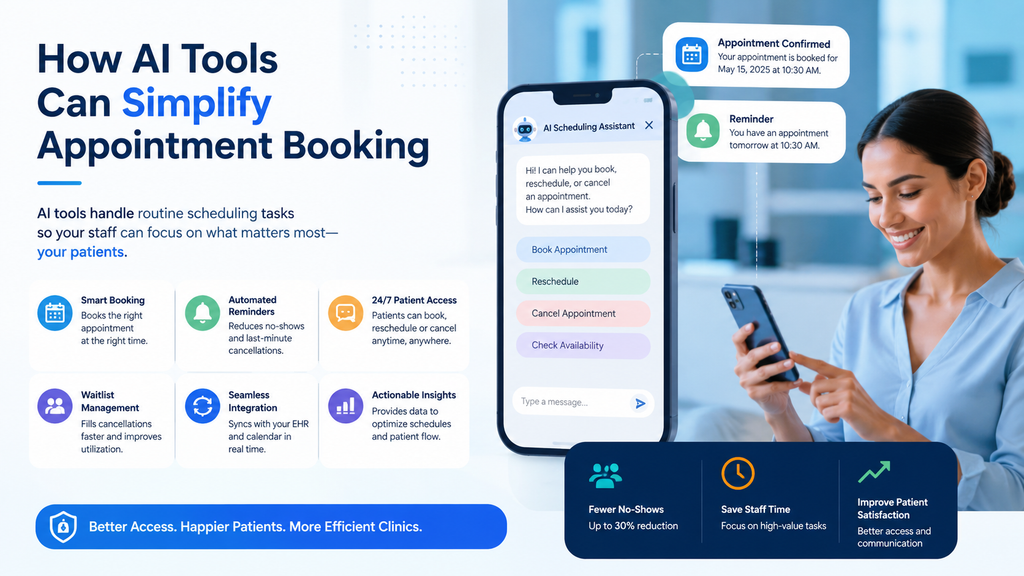
Voice-based systems can also provide another access channel. Patients who prefer speaking with a system may be able to schedule or manage appointments through a phone conversation.
The exact level of automation varies. Some systems may collect a request and send it to staff, while others may have the ability to complete defined scheduling actions.
This distinction matters when evaluating solutions. A practice should understand whether the system actually updates the scheduling system or simply creates another source of messages for staff to process.
A vendor demonstration should include realistic situations. Ask the vendor to demonstrate a routine booking, cancellation, rescheduling request, unavailable provider, and human handoff.
How AI Can Support No-Show Management
Patients may miss appointments for many reasons. They may forget the visit, experience a schedule change, or need another appointment time.
Automated reminders can help patients keep track of upcoming visits. Two-way communication can make reminders more useful by allowing patients to confirm, cancel, or request a different time.
Some AI tools for appointment booking clinics can automate parts of this process. When a patient cancels early enough, a practice may also be able to offer the opening to another patient through a waitlist workflow.
However, practices should be careful with specific claims about no-show reductions. The earlier version of this article cited a 25% to 38% reduction, but that figure was not sufficiently supported as a general industry benchmark.
A better approach is to measure the practice’s own no-show rate before implementation. The same metric can then be reviewed after the technology has been introduced.
Choosing the Best Online Booking System for Doctors
The best online booking system for doctors depends on the practice’s workflow. A solo physician with straightforward appointment types may need a simple booking solution.
A larger practice may need more advanced scheduling rules. These can involve multiple providers, locations, specialties, appointment lengths, or visit types.
Before selecting a platform, map the current process. Identify the requests that consume the most staff time and determine which tasks can be automated safely.
Integration should be a major part of this evaluation. A platform that does not connect properly with the practice’s scheduling environment may create additional manual work.
The best solution is therefore not necessarily the one with the most features. It is the one that fits the practice’s requirements and can operate reliably within its existing workflow.
Comparing Scheduling Options
The top patient scheduling tools for doctors should be compared based on functionality, integration, patient access, and staff requirements.
| Capability | Basic Online Booking | AI Scheduling Assistant | Human Scheduling |
|---|---|---|---|
| Routine appointment booking | Yes | Yes, when configured | Yes |
| Natural-language requests | Limited | Stronger fit | Yes |
| After-hours access | Often available | Can provide it | Usually limited by staffing |
| Complex exceptions | Limited | Requires escalation | Strong fit |
| EHR integration | Varies | Varies | Staff-managed |
| Human interaction | Limited | Available through escalation | Direct |
| Scalability | High | High | Limited by staffing |
| Patient guidance | Limited | Conversational | Personalized |
The top patient scheduling tools for doctors should therefore be assessed according to the actual needs of the practice rather than marketing claims.
A combination of technologies may also be appropriate. Online booking can handle simple requests, AI can support defined administrative workflows, and staff can manage exceptions.
What to Look for in Patient Scheduling Tools
Before purchasing patient scheduling tools for doctors, practices should review integration first. Confirm which EHR and practice-management systems the platform supports and determine exactly what information can move between systems.
Next, review scheduling functionality. Ask whether the platform can create, cancel, and reschedule appointments, and whether staff can configure appointment types, providers, locations, and scheduling rules.
Human escalation is another important consideration. Patients should have a clear way to reach staff when the system cannot complete a request or when the situation requires personal assistance.
Reporting can help practices evaluate performance. Useful measures may include appointment requests, completed bookings, cancellations, rescheduling, transfers, abandoned interactions, and staff interventions.
Practices should also verify language support if they serve multilingual populations. Do not assume that a platform supports a particular language simply because it offers multilingual functionality.
Security and HIPAA Considerations
Scheduling technology may handle protected health information. Privacy and security should therefore be evaluated before implementation.
HHS identifies a third-party AI chatbot used by a healthcare provider for services involving PHI, including appointment scheduling, as an example of a potential business associate relationship.
When a vendor qualifies as a business associate, a Business Associate Agreement generally establishes the vendor’s responsibilities for protecting PHI. HHS explains that business associates can include vendors that create, receive, maintain, or transmit PHI on behalf of a covered entity.
Practices should ask about data storage, retention, access controls, subcontractors, recordings, transcripts, incident response, and how patient information is used.
A vendor’s statement that a product is “HIPAA compliant” should not replace the practice’s own assessment. Practices should understand what information enters the system, where it is processed, who can access it, and how it is retained.
EHR Integration and Interoperability
Integration can determine whether scheduling automation actually saves staff time.
If employees must manually transfer every appointment between systems, some of the benefit may be lost. Practices should confirm whether the platform can access current availability and write completed appointments back to the appropriate scheduling system.
They should also ask how conflicts are handled. A clear fallback process is important if the scheduling integration becomes temporarily unavailable.
The practical question is not simply whether a vendor offers an EHR integration. Practices should understand exactly what the integration supports and whether it works with their specific systems.
How MantraAssist Can Help
MantraAssist positions its platform as a healthcare AI solution for patient communication and administrative workflows. Its published appointment automation materials describe automated booking, rescheduling, cancellations, reminders, waitlist management, and 24/7 self-service scheduling.
Its VoiceAI materials describe automated scheduling through phone interactions, call routing, multilingual support, and 24/7 call handling.
For practices evaluating patient scheduling tools for doctors, the key consideration is how these capabilities fit their existing systems and workflows.
Practices should confirm current EHR integrations, supported scheduling actions, human handoff processes, reporting, security practices, and pricing directly with MantraAssist before implementation.
A product demonstration can also help practices test realistic scheduling scenarios before committing to the platform.
How to Implement an AI Scheduling Assistant
Implementation does not need to happen all at once. A phased approach can help practices identify problems before expanding the technology to more workflows.
Start by reviewing call volume, common appointment requests, cancellations, rescheduling activity, and after-hours demand. Then select one clearly defined workflow.
Routine follow-up scheduling or after-hours requests may be reasonable starting points when the scheduling rules are clear.
Once the initial workflow is stable, the practice can consider additional functions such as reminders, cancellations, rescheduling, or waitlist communication.
Staff training should happen alongside the rollout. Employees need to understand what the AI handles and when they should take over.
What Smart Scheduling Healthcare Tools Cost
Pricing for clinic booking software tools varies by vendor and feature set. Some platforms use monthly subscriptions, while others use per-provider or usage-based pricing.
AI voice systems may charge based on calls or minutes. Other platforms may combine scheduling, messaging, reminders, and patient engagement features under one subscription.
Practices should request a complete pricing breakdown before making a decision. This should include subscription fees, usage charges, implementation, integrations, support, and contract terms.
The goal is to understand the total cost of ownership rather than comparing only the advertised monthly price.
Calculating ROI
The financial value of patient scheduling tools for doctors should be based on measurable outcomes.
Start by measuring current scheduling activity. This may include staff time spent answering calls, managing appointment changes, and following up on requests.
A simple ROI formula is:
ROI = (Financial Benefit − Technology Investment) ÷ Technology Investment × 100
Financial benefits may include reduced administrative workload, improved appointment utilization, or better after-hours access.
Not every operational improvement creates direct revenue. If the technology saves staff time, the value depends on how the practice uses that additional capacity.
Practices should therefore calculate ROI using their own costs and results rather than relying on generic vendor claims.
Final Thoughts
Scheduling technology is becoming an important part of the broader patient-access strategy. Online booking can support straightforward appointments, while conversational AI can provide additional assistance when patients need guidance or prefer voice-based interactions.
Human staff remain essential for complex requests, exceptions, and situations requiring judgment.
The most effective approach may therefore combine different tools. A patient online scheduling system can support self-service booking, AI can handle defined administrative workflows, and staff can manage situations that require human attention.
When evaluating patient scheduling tools for doctors, focus on integration, workflow accuracy, security, usability, patient access, and measurable results.
Avoid relying on unsupported statistics or guaranteed outcomes. Establish a baseline first, then measure performance after implementation.
For some practices, basic online booking may be enough. For others, AI can provide additional scheduling capacity and after-hours access.
The goal is not to adopt the most advanced technology available. It is to make appointment scheduling easier for patients while allowing staff to focus on work that requires human attention.
Frequently Asked Questions
Smart scheduling healthcare software uses automation, rules, or AI to support appointment-related workflows. Depending on the platform, it may help patients book, confirm, cancel, or reschedule appointments through online, voice, text, or chat channels.
AI can automate reminders and support two-way communication. Depending on the platform, patients may be able to confirm an appointment, cancel it, or request another time. Practices should measure their own results rather than rely on a universal reduction percentage.
It can be sufficient for straightforward appointments. Practices with more complex workflows may benefit from combining online booking with AI and human support.
AI can automate selected administrative tasks, but it should not be viewed as a complete replacement for staff. Employees remain important for complex requests, patient concerns, exceptions, and in-person support.
Top options include MantraAssist, NexHealth, Tebra, and Zocdoc, with features ranging from AI-powered scheduling and patient communication to online booking, reminders, and practice-management workflows.